AI Tool Spend Report
Last updated: April 14, 2026
Overview
The AI Spend Report is a beta feature that provides visibility into your organization's investment in AI coding tools. This report helps you track and analyze spending across developer tools like Cursor, GitHub Copilot, and Claude Code, breaking down costs into subscription-based and usage-based components.
With the AI Spend Report, you can:
Track total AI tool costs over time
Understand spending patterns across your organization
Analyze cost per developer to optimize tool allocation
Break down costs by tool and AI model to identify usage trends
Monitor base subscriptions vs. overage costs for budget planning
Navigate to Organization → AI Transformation → AI Spend to access the report.
Setup
Integration setup
Claude code API integration
AI spend integration settings
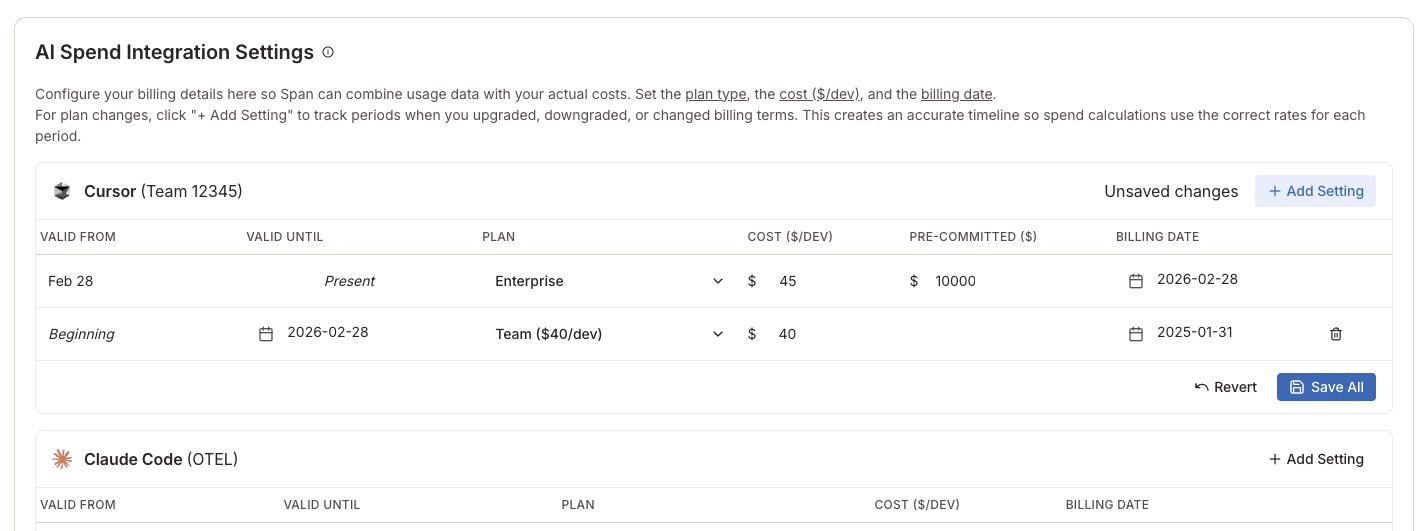
In order to accurately calculate base spend over time, we need to be aware of the license cost per person and billing date. To set this up, you can visit Settings -> Integrations and go to the AI Spend Integration Settings section of the page.
You can configure multiple plan settings over time to accurately reflect plan changes (e.g., upgrading from Team to Enterprise). Each plan setting has a Valid From and Valid To date range. When calculating base spend, Span applies the correct plan rate for each time period, so historical queries always reflect the accurate cost.
You can also set up historical per-person plan settings for Claude code in the Claude Code user mappings section of the page. Those override the default settings so please make sure to set up the most common plan for OTEL and then only select specific people for the different seat options.
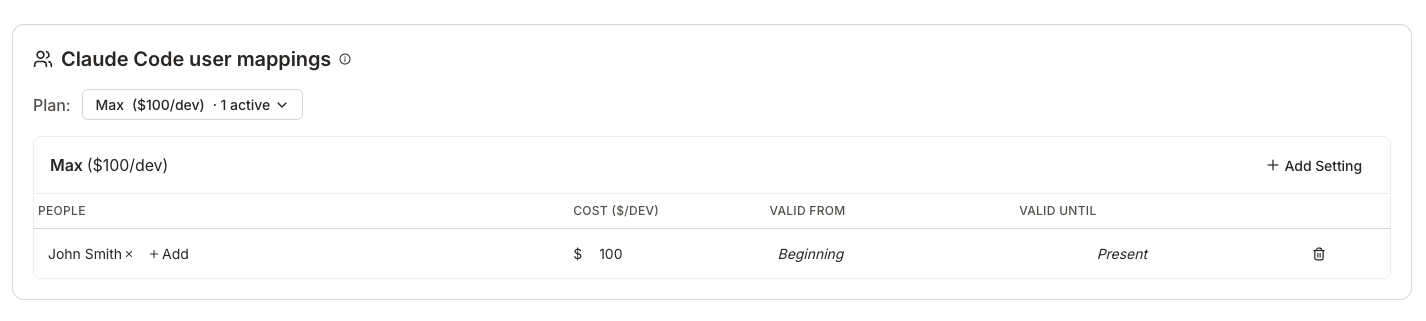
Keep in mind that individual accounts can be tracked only for Claude code via OTEL - other tools require an integration for the organization / team.
Available plans by tool
Tool | Available plans |
Cursor | Team ($40/dev/mo), Enterprise |
Claude Code | API ($0), Pro ($20), Max ($100), Team Standard ($25), Team Premium ($125), Enterprise ($20) |
GitHub Copilot | Business ($19/dev/mo), Enterprise ($39/dev/mo) |
Base spend
Base spend is your predictable, subscription-based cost - the fixed monthly fee charged per seat for each active developer.
Base Spend = Plan Cost per Developer × Number of Active Developers × Time PeriodFor each tool we calculate daily license spend per person in various ways.
Cursor
Data source: Cursor's daily usage API endpoint.
Settings: Per-connection plan settings. Each Cursor integration connection can have its own plan/pricing with a default fallback to Team plan.
Identifier for each person is email address. Please make sure to use the same email you use in Span for your Cursor account.
Copilot
Data source: GitHub Copilot seat assignments endpoint.
Settings: Pricing is determined by
plan_typefrom the seat assignments data and it is not configurable in the app. Only the billing date is available to configure and defaults to the 1st of each month.Identifier for each person is GitHub username. Please make sure to add all your used GH usernames in Span.
Claude Code
Data source: OTEL collector data is used for base spend attribution.
Why OTEL only: The Anthropic usage report API provides data for API users only, so subscription cost for those users is always $0. OTEL data, by contrast, arrives regardless of license type and allows for a variety of plans to be tracked - both personal and team subscription accounts are available if you have the correct setup. The Claude code API's usage report data is still used for overage cost attribution.
Settings: Org-level OTEL settings apply to all users by default. Individual users can have person-level plan overrides configured in Settings.
Identifier for each person is email address. Please make sure to use the same email you use in Span for your work email setting in the OTEL configuration.
Override merging: When a person has custom plan settings, we splice those overrides into the OTEL base timeline, producing a gapless sequence of settings. Override periods use the override's plan/cost but inherit the billing date from the base setting in effect at that point.
Overage spend
Overage spend represents variable costs for additional usage beyond your base subscription. This includes:
Token usage charges for AI models
Premium feature usage
API calls beyond subscription limits
Cursor
Data source: Cursor's filtered usage events API endpoint.
Included events: For non-Enterprise customers, only on-demand events are included in overage cost. For Enterprise, the events are categorized as "Included in Business" even if they do not fit into the licensed usage limits due to pre-committed costs in each contract. We include those in Overage calculation from the point when Enterprise plan becomes valid.
Claude Code
Data source: OTEL collector provides us the metrics
claude_code.cost.usageandclaude_code.token.usage. We also use Claude code usage report data (Anthropic API) when available with a higher priority than OTEL.Usage report for API keys: If you are using API keys for Claude code, you can set up the API key names in People management the same way you set up your VCS usernames. The usage via API key and email will be combined together in the report.
Copilot
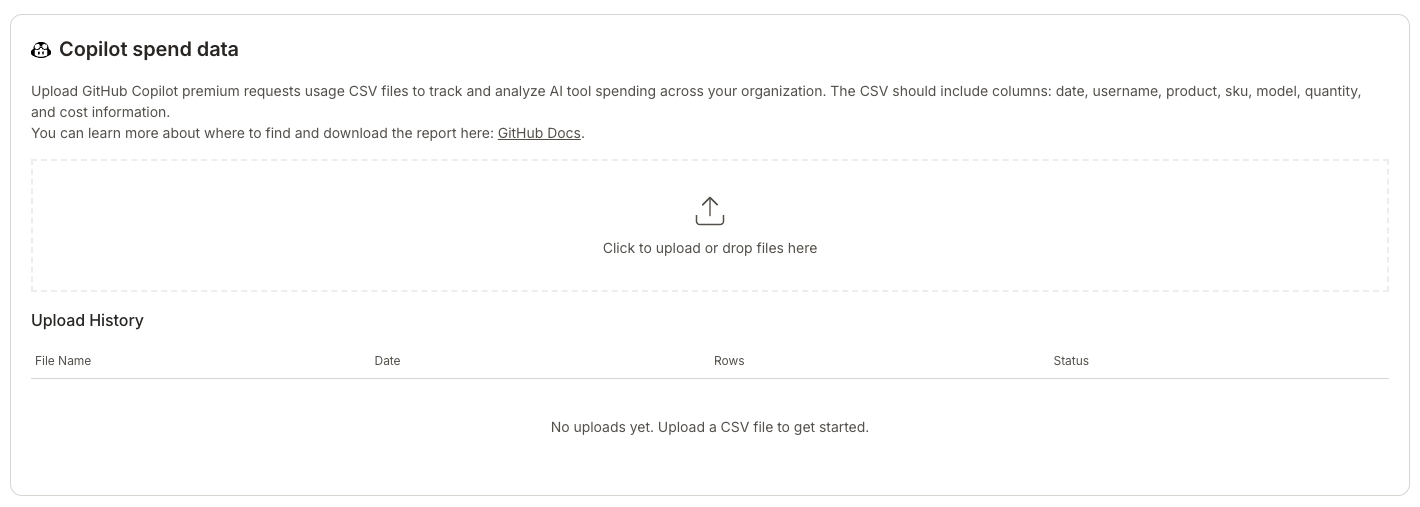
Data source: Premium requests data is not available through the Copilot API. We allow users to import a CSV that's extracted from GitHub UI in order to track overage spend. Another limitation is that GH does not expose token spend through API or CSV exports.
You can see an example of the info we need here: https://github.com/orgs/community/discussions/157693#discussioncomment-13304789
You should be able to find the report here (please double check that it matches the report in the community discussion above)
https://docs.github.com/en/rest/billing/usage?apiVersion=2022-11-28#get-billing-premium-request-usage-report-for-an-organization
Report Features
AI Spend Visualization
The main chart offers multiple views to analyze your spending:
Base & Overage View (Default)
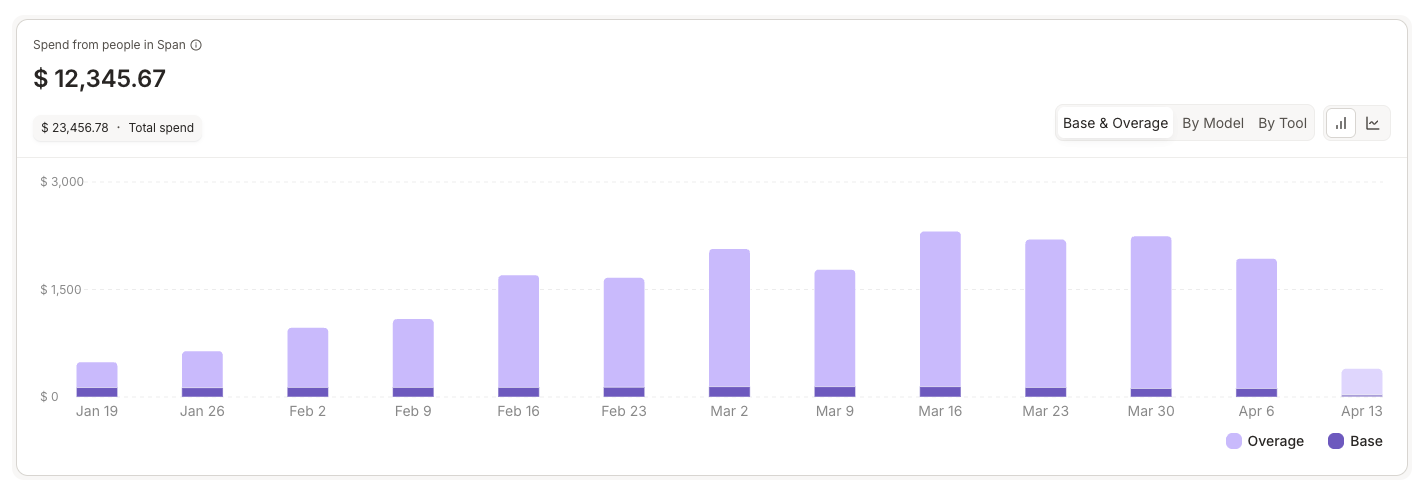
Stacked bars showing base vs. overage spend trends over time
Quickly identify when overage costs spike
By Model View
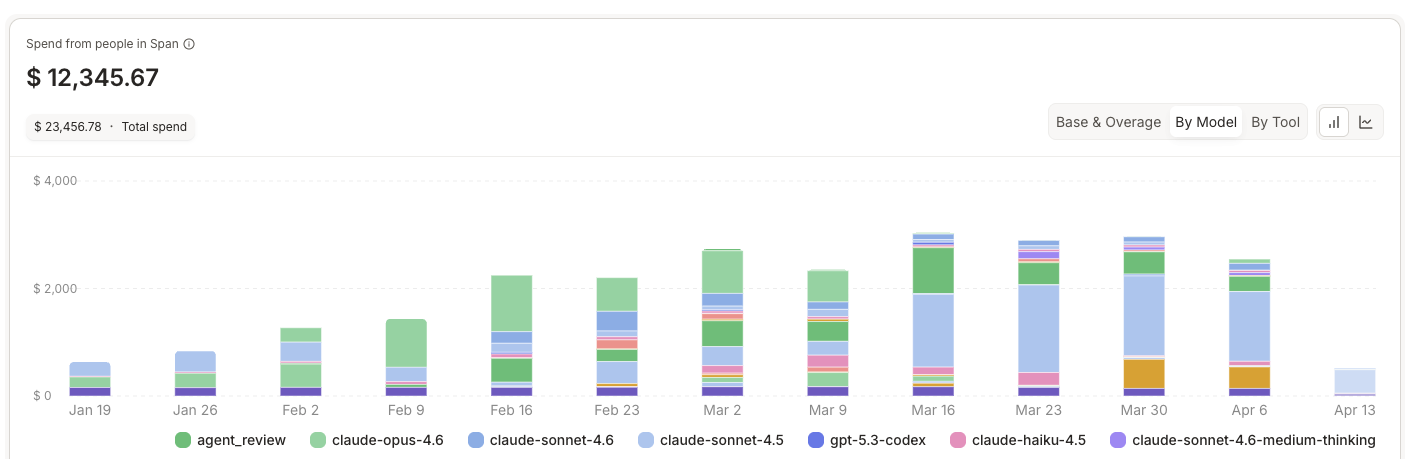

Line chart showing spend per AI model (e.g., GPT-4, Claude, etc.)
Understand which models your team uses most
By Tool View
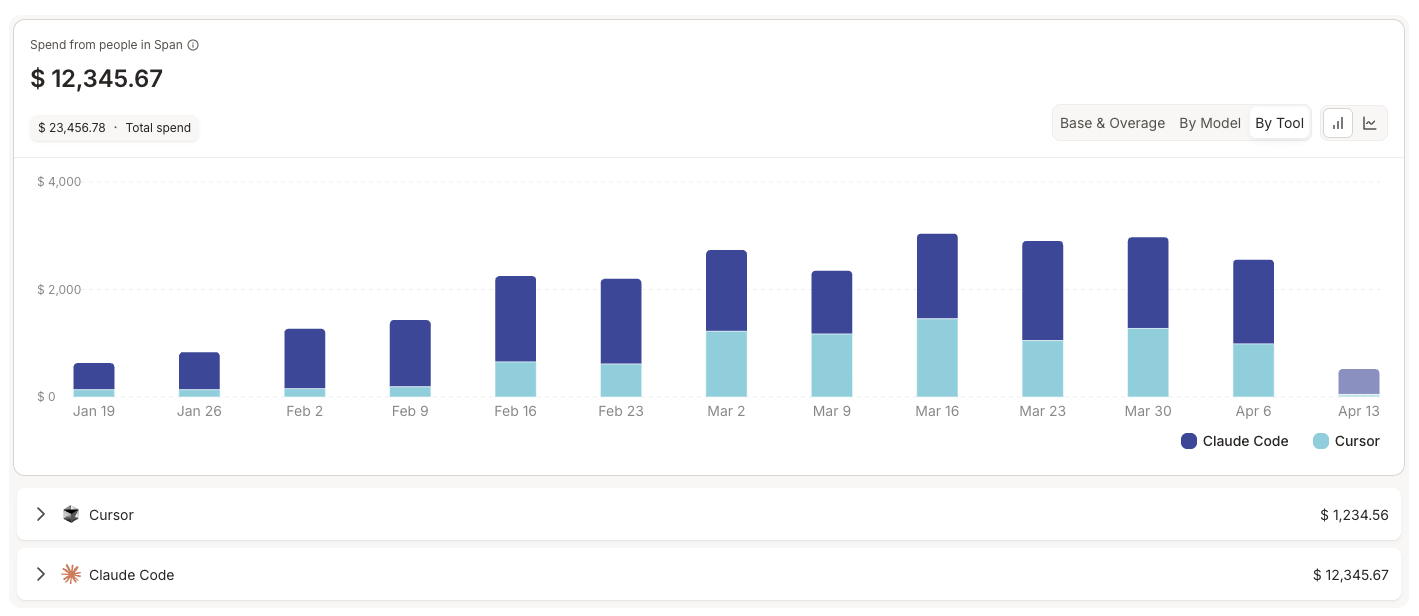
Stacked bars showing spend per developer tool (Cursor, Copilot, Claude Code)
Compare tool adoption and costs
Toggle between Bar Chart and Line Chart formats using the chart type selector.
Summary Cards

Three summary cards provide quick insights:
Total Base Spend - Shows your total subscription costs with period-over-period comparison
Total Overage Spend - Displays variable usage costs with trend indicators
Average Cost per Developer - Your per-developer spending average
Spend Breakdown by Tool & Model
Expandable cards provide detailed breakdowns including:
Overage spend per tool and model combination
Input token usage
Output token usage
Total costs for each category
Filtering & Analysis
Refine your view using available filters:
Date Range: Select the time period to analyze
Teams & People: Filter by specific teams or individuals
Person Attributes:
IC Level
Manager Status
Job Title
Location
Data Table View
Switch to table view for a detailed breakdown by person, showing:
Individual developer spending
Metrics across selected time period
Filterable and sortable columns
Troubleshooting
❓ Missing base spend data?
Verify your tool plan settings are configured
Check that the correct plan cost and billing date are set
Ensure the tool is actively being used by developers in Span
❓ Overage costs seem incomplete?
For Claude Code: Check if there are known data collection issues
Verify integrations are healthy and collecting telemetry data
Contact support if gaps persist
❓ Don't see your tools?
Only tools with active usage data appear in the report
Configure settings for tools you want to track
Verify integrations are properly set up
Frequently Asked Questions
Q: Why don't I see any data in the report?
A: Ensure that (1) AI tool plan settings are configured, (2) developers are actively using the tools, and (3) integrations are collecting data properly.
Q: Can I track different plans for different teams?
A: Not currently. The system supports a single plan per tool across your organization. Support for mixed plans is under consideration for future releases.
Q: How far back can I view historical spend data?
A: Historical data availability depends on when you enabled the feature and configured tool settings. Spend calculations begin from your configuration date.
Q: What happens if I change my plan mid-month?
A: The ability to edit historical settings is being developed. Currently, plan changes apply from the update date forward. Contact support for guidance on handling mid-period changes.
Q: Are the costs I see actual charges from the tool providers?
A: The report calculates estimated costs based on your configured plans and observed usage. Base costs are calculated from your plan settings × active developers. Overage costs are estimated from token usage × model pricing. Always verify with your actual bills from tool providers.
Need Help?
If you have questions about the AI Spend Report or need assistance:
Contact your Span account team
Reach out to support@span.app